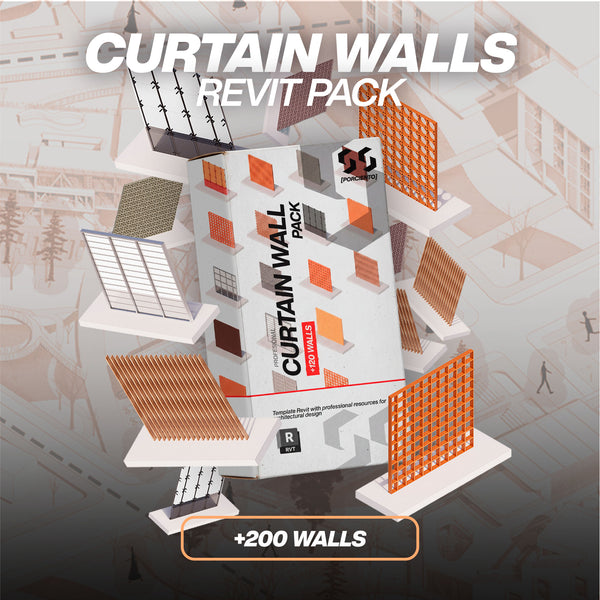
Understanding how to build a parametric curtain wall revit system is a fundamental skill for any architectural professional aiming to elevate their BIM workflows. Facade design is often the most visually impactful element of a building, and Revit offers a robust, dynamic environment to model these systems with precision. Whether you are developing a sleek commercial skyscraper, a contemporary cultural center, or an intricate residential exterior, mastering these tools allows you to bridge the gap between creative vision and technical execution. This comprehensive guide will walk you through the core mechanics, advanced techniques, and professional best practices to ensure your facades are both beautiful and fully optimized for the BIM lifecycle.
Understanding the Parametric Curtain Wall Revit Ecosystem
When transitioning from basic 3D modeling to advanced Building Information Modeling (BIM), the concept of parametric design becomes central to your efficiency. Unlike standard architectural walls in Revit, which are typically defined by static, parallel layers of materials (such as brick, air gaps, and insulation), a parametric curtain wall is fundamentally different. It is defined by a flexible grid system composed of horizontal and vertical divisions that dictate the entire structure of the facade.
The defining characteristic that makes these curtain wall families revit so powerful is their parametric nature. The term "parametric" implies that every component—the spacing of the grid lines, the specific types of panels inserted, and the profiles of the mullions—is controlled through adjustable mathematical parameters. If a client requests a change to the floor-to-floor height of a building, a properly constrained curtain wall will automatically recalculate its grid divisions and update the geometry without requiring you to manually redraw every single pane of glass.
This automation is what makes parametric curtain walls incredibly efficient for iterating and testing various facade designs during the schematic design and design development phases. Instead of spending hours remodeling an elevation, you can simply adjust a numerical value in the properties panel and instantly see the results. This level of control is essential for managing complex projects and maintaining data consistency across all your architectural drawings.

The Core Anatomy of Revit Facade Families
To successfully manipulate a parametric curtain wall revit system, you must first understand the individual elements that construct it. A Revit curtain wall is not a single, solid object; it is an assembly of several distinct, interdependent categories. Understanding this anatomy is the first step toward creating custom, high-quality revit facade families.
The Curtain Grid: The Invisible Framework
The curtain grid is the backbone of the entire system. It acts as an invisible, structural framework consisting of horizontal and vertical reference lines that divide the overall wall area into smaller, manageable cells. You can think of the grid as the skeleton of your facade. Grids can be defined automatically by setting distance or number parameters in the curtain wall's Type Properties, or they can be drawn manually to achieve highly specific, non-uniform architectural rhythms.
Curtain Panels: The Architectural Infill
Curtain panels are the physical elements that fill the empty cells created by the curtain grid. While glass is the most common material used, Revit allows for incredible versatility here. You can replace default glass panels with solid metal composite materials, spandrel panels to hide floor slabs, operable louvers for mechanical ventilation, or even custom parametric components. The panel automatically adapts to the size and shape of the grid cell it occupies, meaning that as you adjust the grid, the panel resizes perfectly.
Mullions: The Structural and Visual Framing
Mullions are the visible framing members placed along the segments of the curtain grid. These represent the structural aluminum extrusions, steel frames, or timber elements that hold the panels in place. By altering the mullion profile family, you can change a flat, standard rectangular cap into an intricate, custom-designed extrusion that matches real-world manufacturer specifications.
Corner Mullions: Managing Complex Intersections
Architectural facades rarely exist on a single flat plane. When curtain walls meet at building corners, standard mullions often intersect poorly, creating visual errors and inaccurate material takeoffs. Corner mullions are specialized profile types designed explicitly to handle these wall-to-wall transitions cleanly. They resolve the geometry at internal and external corners, ensuring that your 3D models and construction details remain precise and professional.
Standard Grid Systems vs. Custom Architectural Patterns
Depending on the typology of your project, your approach to generating the facade will vary significantly. Revit accommodates both highly repetitive commercial structures and bespoke, intricate designs.
Designing Standard Grid Curtain Walls
Standard grid systems are the most common and straightforward type of curtain wall to model. They consist of uniform, rectangular panels with a consistent, repeating grid spacing. This approach is perfect for large-scale office buildings or institutional structures where uniformity is key to cost control and aesthetic rhythm.
To set this up, you access the Type Properties of the curtain wall and define fixed rules for the vertical and horizontal grids. For example, you might establish a fixed horizontal spacing of 1500mm and a fixed vertical spacing of 3600mm. Once these rules are set, Revit automatically propagates the grid across the entire length and height of the wall, instantly applying uniform panels and mullions. Because the logic is entirely driven by type parameters, these walls are exceptionally fast to create, edit, and document.
Crafting Custom Pattern Curtain Walls
When your design calls for a more dynamic and less repetitive aesthetic, standard rules will not suffice. For more complex architectural facades, you will need to bypass the automatic type rules and manually adjust individual grid lines. This allows you to create asymmetric, randomized, or highly specific rhythmic patterns.
In a custom pattern wall, you might have narrow vertical ventilation louvers alternating randomly with wide, clear glass panels, interspersed with opaque metal spandrels. By combining different panel types within the same continuous wall element, you generate a rich, dynamic composition. This technique is heavily utilized in contemporary residential and mixed-use facades, where visual variety and breaking up massive volumes are critical design strategies.
Advanced BIM: Curtain Wall Panels as Nested Families
If you want to push the boundaries of what is possible, you must move beyond basic materials and explore the most advanced technique in facade modeling: creating custom curtain wall panels utilizing nested components. This is where a standard 3D model transforms into a deeply intelligent BIM asset.
A nested family is simply a Revit family loaded inside another Revit family. When applied to curtain walls, this means you can design a panel that isn't just a flat piece of glass, but a complex assembly containing its own sub-elements. Excellent examples of this workflow include panels featuring integrated parametric sun shading devices, operable awning windows with swing trajectories, or intricate, angle-adjustable ventilation louvers.
Because these nested families can carry their own independent parameters (such as the angle of a louver blade or the extension depth of a sunshade), the overarching curtain wall becomes an extremely flexible, data-rich ecosystem. You can schedule these nested elements independently, tag them with specific manufacturer data, and link their geometric behavior to the broader project coordinates to optimize for solar heat gain. Exploring our comprehensive Revit Assets collection can provide you with excellent examples of how these advanced nested structures operate in practice.
Best Practices for Managing Curtain Wall Families Revit
Creating a complex facade is one thing; managing it efficiently within a large architectural project is another. To avoid performance issues, modeling errors, and documentation nightmares, it is crucial to adhere to professional best practices when working with these systems.
Start Simple and Iterate Progressively
Never attempt to model the final, most detailed version of a complex facade on your very first pass. Begin with a basic, lightweight curtain wall type using simple grid lines and generic panels. This allows you to lock in the overall massing, proportions, and rhythm without bogging down your model's performance. Once the macro-design is approved, progressively swap out the generic components for high-LOD (Level of Development) nested panels and detailed mullion profiles.
Utilize Named Curtain Wall Types
Resist the temptation to modify a single curtain wall instance heavily using the manual grid tool unless absolutely necessary. Instead, create distinct, logically named Curtain Wall Types for different facade conditions (e.g., "CW-01_South Facade_Louvered", "CW-02_Ground Floor_Storefront"). This ensures consistency across the project and allows for rapid global updates.
Protect Your Logic: Pin Critical Grids
As a project develops and multiple team members access the model, the risk of accidental modifications increases. When you have meticulously aligned a grid line to correspond with an interior structural column or a critical floor datum, use the Pin tool. Pinning prevents the grid from being moved or deleted accidentally, safeguarding your design intent.
Plan Your Mullion Hierarchy
A realistic facade has a clear structural hierarchy. Your primary load-bearing mullions should utilize different, larger profiles compared to your secondary or tertiary visual framing elements. Managing this hierarchy correctly not only improves the visual realism of your renderings but also ensures your structural details and material takeoffs are accurate.
Verify Across All Views and Schedules
Do not rely solely on the 3D view. Constantly test and verify your curtain wall system across different scales and view types. Ensure it reads correctly in large-scale floor plans, technical wall sections, and fine-detail elevation views. Furthermore, rigorously document your panel schedules. Use Revit's scheduling tools to extract metadata, track panel types, calculate precise surface areas, and generate accurate quantity takeoffs for reliable cost estimation.
Step-by-Step Curtain Wall Tutorial for Complex Facades
A practical curtain wall tutorial approach is the best way to solidify these concepts. When tasked with building a facade that demands both precision and visual flair, follow this structured workflow to ensure success.
First, establish your base geometry by drawing the curtain wall footprint in the floor plan view. Ensure your base constraint and top constraint align perfectly with your building's structural levels. Next, navigate to an elevation view to begin defining the grid. If the design is repetitive, utilize the Type Properties to set fixed vertical and horizontal layouts. If the design is bespoke, use the Curtain Grid tool from the Architecture tab to place lines exactly where you need them.
Once the grid is established, focus on panel assignment. Hover over a panel edge, press the 'Tab' key on your keyboard until the panel highlights, and click to select it. Unpin the panel (if it is driven by type rules) and swap it out via the Properties Palette for your desired material or nested custom family. Finally, apply your mullions. Use the Mullion tool and select 'All Grid Lines' for rapid placement, or 'Grid Line Segment' for precise, localized control. Remember to select the correct mullion profile from your loaded families to reflect the accurate architectural detailing.
Why Pre-Built Curtain Wall Libraries Save Projects
While mastering the creation of these systems is a valuable skill, building complex, highly detailed parametric components from scratch for every single project is an inefficient use of a designer's time. Advanced family creation requires deep technical knowledge of Revit's constraint systems, formula syntax, and reference plane hierarchies.
To put this into perspective, modeling a single, robust custom panel family—complete with nested louvers, parametric material controls, and proper LOD visibility settings—can easily take an experienced BIM manager 4 to 8 hours to execute flawlessly. If your architectural facade design requires 20 to 50 distinct panel variations to achieve the desired aesthetic, you are suddenly facing weeks of dedicated family creation work before you can even begin applying them to your building model.
This is where integrating professional resources becomes a critical business decision. Utilizing comprehensive, pre-built libraries allows you to bypass the arduous modeling phase and instantly access a vast array of high-quality components, enabling you to focus entirely on the design and composition of your architecture.
Take Your Architecture to the Next Level
At 99Porciento Studios, we understand that time is your most valuable asset in architectural design. To help you optimize your workflow and instantly upgrade your facade modeling capabilities, we developed the Pack +200 Curtain Walls (Parametric).
Priced at just $49.00 USD, this comprehensive library provides over 200 ready-to-use, fully parametric curtain wall families. It covers everything from standard commercial grids and custom rhythmic patterns to complex shading systems, detailed louver panels, and highly intricate decorative screens.
-
Massive Library: Over 200 distinct, highly detailed facade components.
-
Fully Parametric: Every family is rigorously tested and infinitely adjustable to fit your specific project dimensions.
-
Version Compatibility: Built and tested to function flawlessly in Revit 2020 through 2026.
- Immediate ROI: Save hundreds of hours of tedious modeling work across multiple projects.